AdvantageAir2MQTT
A new Daikin reverse cycle central air conditioning system, to replace the old gas unit, came with a zoning duct system. The zoning duct work involves motorized vanes which direct air flow. All of this is under the control of a software system called MyAir (https://www.advantageair.com.au/myair/). The challenge is to integrate the system with the home automation (OpenHAB), the analytics (OpenSearch) and the more recent Artificial Intelligence (OpenWeb-UI, Ollama). Achieving this lofty goal requires the different systems to talk via MQTT. That's where this simple piece of Python code comes in.

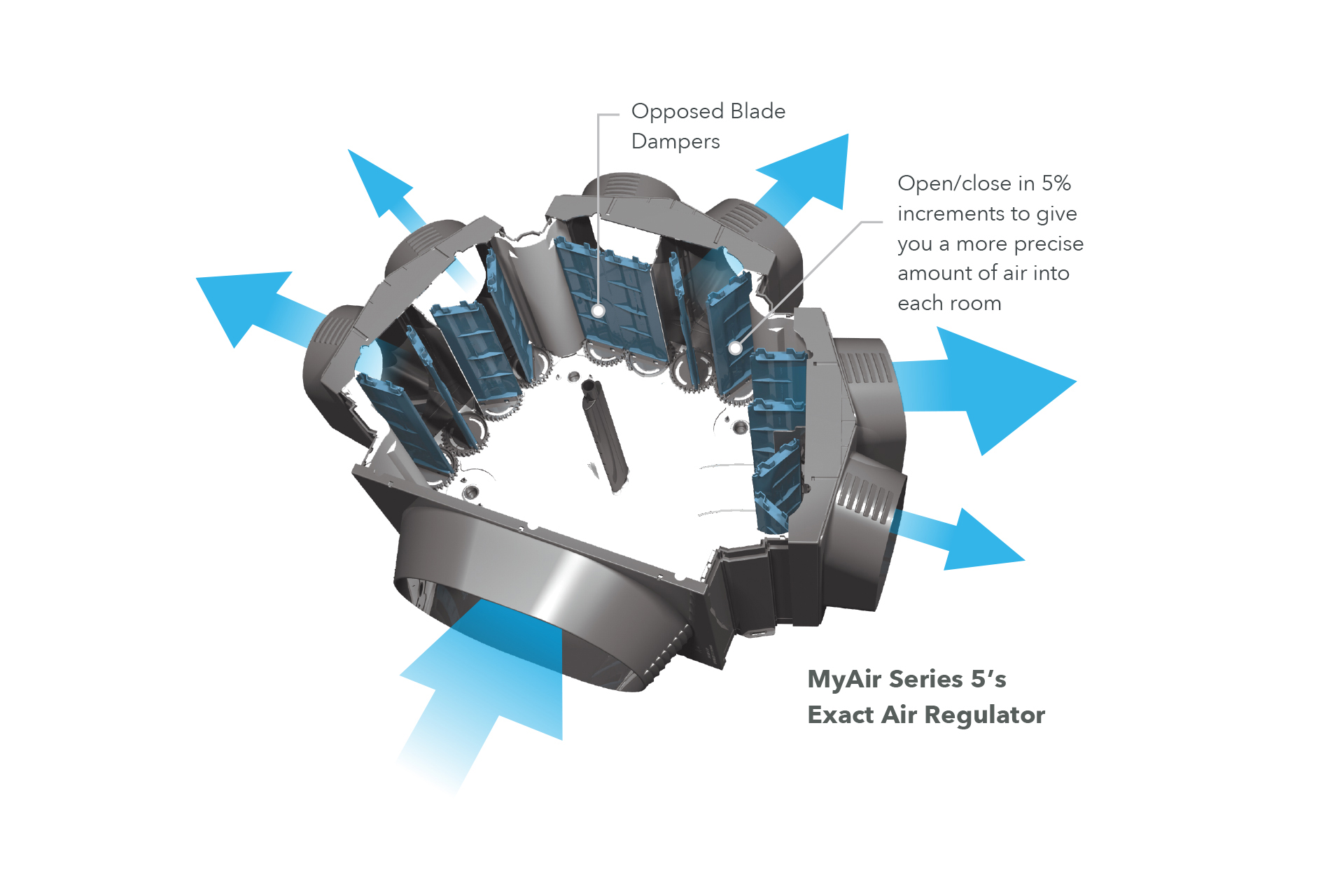 Example of a motorized damper system directing air to the different zones.
The air conditioner itself is a Daikin system (RZAS160C2V1) which is managed by the MyAir system.

In ceiling unit
The heat pump as installed at Electricbrain HQ is a 16kW unit

Outdoor unit
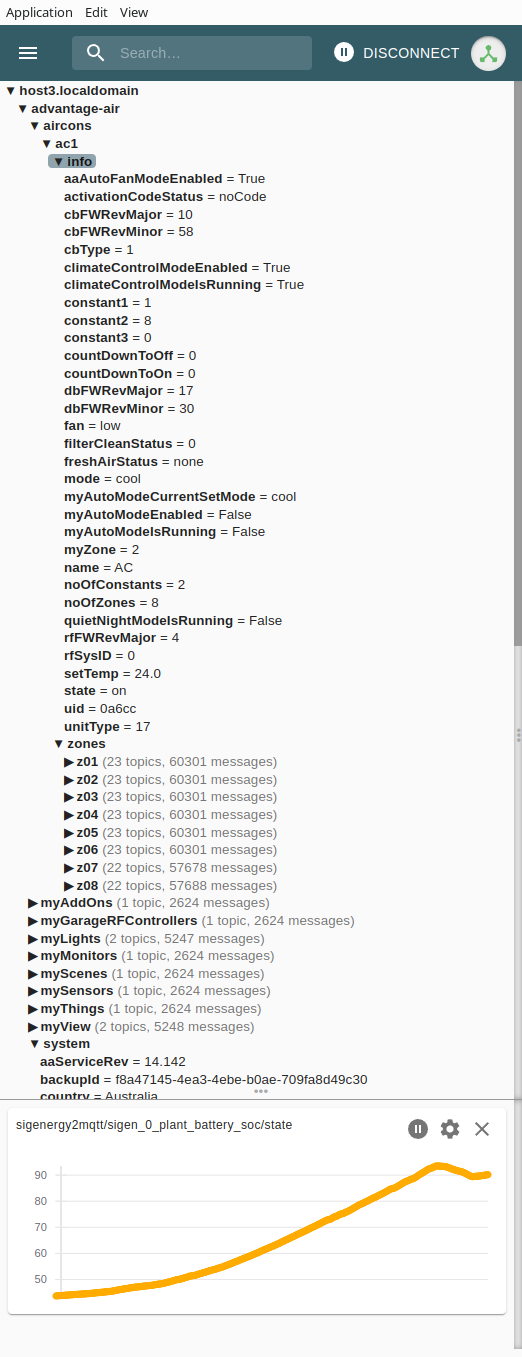
The resulting output into the MQTT server looks like this in MQTT Explorer:
advantage-air
  aircons
    ac1
      info
        aaAutoFanModeEnabled = True
        activationCodeStatus = noCode
        cbFWRevMajor = 10
        cbFWRevMinor = 58
        cbType = 1
        climateControlModeEnabled = True
        climateControlModeIsRunning = True
        constant1 = 1
        constant2 = 8
        constant3 = 0
        countDownToOff = 0
        countDownToOn = 0
        dbFWRevMajor = 17
        dbFWRevMinor = 30
        fan = low
        filterCleanStatus = 0
        freshAirStatus = none
        mode = cool
        myAutoModeCurrentSetMode = cool
        myAutoModeEnabled = False
        myAutoModeIsRunning = False
        myZone = 2
        name = AC
        noOfConstants = 2
        noOfZones = 8
        quietNightModeIsRunning = False
        rfFWRevMajor = 4
        rfSysID = 0
        setTemp = 24.0
        state = on
        uid = 0a6cc
        unitType = 17
      zones
        z01
          error = 0
          firebaseSensorUpdateStore
          followers = []
          following = 0
          maxDamper = 100
          measuredTemp = 23.4
          minDamper = 0
          motion = 0
          motionConfig = 1
          name = TV Living
          number = 1
          rssi = 46
          SensorUid = 0253a3
          setTemp = 23.0
          state = open
          tempSensorClash = False
          type = 1
          value = 55
        z02
          error = 0
          firebaseSensorUpdateStore
          followers = []
          following = 0
          maxDamper = 100
          measuredTemp = 23.5
          minDamper = 0
          motion = 0
          motionConfig = 1
          name = Kitchen
          number = 2
          rssi = 48
          SensorUid = 0253a2
          setTemp = 23.0
          state = open
          tempSensorClash = False
          type = 1
          value = 100
        z03
          error = 0
          firebaseSensorUpdateStore
          followers = []
          following = 0
          maxDamper = 100
          measuredTemp = 22.5
          minDamper = 0
          motion = 0
          motionConfig = 1
          name = Lounge
          number = 3
          rssi = 45
          SensorUid = 02539f
          setTemp = 23.0
          state = open
          tempSensorClash = False
          type = 1
          value = 5
        z04
          error = 0
          firebaseSensorUpdateStore
          followers = []
          following = 0
          maxDamper = 100
          measuredTemp = 22.0
          minDamper = 0
          motion = 0
          motionConfig = 1
          name = Bed Master
          number = 4
          rssi = 41
          SensorUid = 0253a0
          setTemp = 23.0
          state = open
          tempSensorClash = False
          type = 1
          value = 5
        z05
          error = 0
          firebaseSensorUpdateStore
          followers = []
          following = 0
          maxDamper = 100
          measuredTemp = 23.0
          minDamper = 0
          motion = 0
          motionConfig = 1
          name = Office
          number = 5
          rssi = 32
          SensorUid = 02539d
          setTemp = 23.0
          state = open
          tempSensorClash = False
          type = 1
          value = 5
        z06
          error = 0
          firebaseSensorUpdateStore
          followers = []
          following = 0
          maxDamper = 100
          measuredTemp = 21.8
          minDamper = 0
          motion = 0
          motionConfig = 1
          name = Bed Guest
          number = 6
          rssi = 40
          SensorUid = 0253b1
          setTemp = 23.0
          state = open
          tempSensorClash = False
          type = 1
          value = 5
        z07
          error = 0
          firebaseSensorUpdateStore
          followers = []
          following = 0
          maxDamper = 100
          measuredTemp = 0.0
          minDamper = 0
          motion = 0
          motionConfig = 1
          name = Bath
          number = 7
          rssi = 0
          setTemp = 24.0
          state = open
          tempSensorClash = False
          type = 0
          value = 100
        z08
          error = 0
          firebaseSensorUpdateStore
          followers = []
          following = 0
          maxDamper = 100
          measuredTemp = 0.0
          minDamper = 0
          motion = 0
          motionConfig = 1
          name = Entry
          number = 8
          rssi = 0
          setTemp = 24.0
          state = open
          tempSensorClash = False
          type = 0
          value = 100
  myAddOns
  myGarageRFControllers
  myLights
  myMonitors
  myScenes
  mySensors
  myThings
  myView
  system
    aaServiceRev = 14.142
    backupId = f8a47145-4ea3-4ebe-b0af-709fa8d49c30
    country = Australia
    dealerPhoneNumber = 0123456789
    deviceIds = ['NsPoVTT45bhpHhIoOdGCmBJ5JKp3', '1QDqoYi3V8RIq4OTmWhoqEZx0063', 'EKK9urSYQCVT6n5UdaKYISTpLEX3', 'thFkSKET2NM9oT5xgK4CTOMeOsl2']
    deviceIdsV2
    deviceNames
    deviceNotificationVersion
    drawLightsTab = False
    drawThingsTab = False
    garageDoorReminderWaitTime = 2
    garageDoorSecurityPinEnabled = True
    hasAircons = True
    hasLights = False
    hasLocks = False
    hasSensors = False
    hasThings = False
    hasThingsBOG = False
    hasThingsLight = False
    isValidSuburbTemp = False
    latitude = -40.7665875
    lockDoorReminderWaitTime = 2
    logoPIN = 4108
    longitude = 147.29207689999998
    membershipStatus = NotAMember
    mid = 0a6cc
    myAppRev = 15.1506
    name = MyPlace
    needsUpdate = False
    noOfAircons = 1
    noOfSnapshots = 0
    postCode = 1234
    remoteAccessPairingEnabled = True
    rid = AcHdv5iYQtWxH2BvDgT8q2c0U332
    showMeasuredTemp = True
    splitTypeSystem = False
    suburbTemp = 16.4
    sysType = MyAir5
    tspErrorCode = noError
    tspIp = 192.168.1.29
    tspModel = PIC8GS12
Communicating with MyAir
Talking to the Advange Air android pad's app, MyAir, is quite straight forward:
curl -X GET http://advantage-air:2025/getSystemData
where advantage-air is the local IP address on your LAN. The unit replies with lots and lots of JSON. That can be formatted by piping the returned text into jq:
curl -X GET http://advantage-air:2025/getSystemData | jq
Sending encoded JSON (officially known as percent-encoding) to the advantage-air controller can turn things on and off too:
curl -X GET http://advantage-air:2025/setAircon?json=%7B%22ac1%22%3A%7B%22info%22%3A%7B%22state%22%3A%22off%22%7D%7D%7D
AdvantageAir2MQTT Python program
The python program makes use of curl to talk to MyAir. The result is placed in a Python dictionary. From there it's converted to MQTT data commands. These are sent at a rate of about 10 per second. When everything has been sent the program disconnects from the MQTT server and goes to sleep for 60 seconds.
Most configuration parameters are gleaned from linux environment variables. This has the advantage of making things configurable from Docker.
It also need to be pointed out that the MQTT library version has to be less that 2.0.0 (i.e. version 1):
pip install "paho-mqtt<2.0.0"
Use this exact syntax to install the needed module (which at the time of writing in late 2025 is version 1.61) into your Python environment - Docker container details are described below.
#!/usr/bin/env python3
# advantageair2mqtt.py
#
# Queries AdvantageAir MyAir, convert and sends the results to MQTT server.
# Ctrl‑C stops the program.

import json
import os
import paho.mqtt.client as mqtt
import subprocess
import time

# Advantage Air tablet
advantageair_address = os.environ['ADVANTAGE-AIR']
# MQTT Broker details
broker_address       = os.environ['MQTT_ADDRESS']
port                 = int(os.environ['MQTT_PORT'])
base_topic           = os.environ['MQTT_BASE_TOPIC']
MQTT_USERNAME        = os.environ['MQTT_USERID']
MQTT_PASSWORD        = os.environ['MQTT_PASSWORD']
MQTT_ALLOWED_TYPES   = [bool, bytearray, float, int, None, str]

# Define some empty variables
advantageair_data    = {}
json_payload         = ""
key_array            = []
mqtt_messageid       = 0

def on_connect(client, userdata, flags, rc):
   """Callback function for when the client connects to the broker."""
   if rc == 0:
       print("Connected successfully to MQTT Broker")
   else:
       print(f"Failed to connect, return code {rc}")

def on_publish(client, userdata, mid):
   global mqtt_messageid
   """Callback function for when a message is published."""
   mqtt_messageid = mid

def publish_recursive_dict(client, d, depth=0):
   global key_array
   topic = base_topic
   if depth == 0:
       key_array = [""]
   else:
       del key_array[depth:]
       key_array.append("")
       for key_element in key_array:
          if key_element != "":
              topic += "/" + key_element

   for key, value in d.items():
       print_topic = topic + "/" + key
       if isinstance(value, dict):
           key_array[depth] = key
           publish_recursive_dict(client, value, depth + 1)
       else:
           if type(value) == list:
               value = str(value)
           if type(value) in MQTT_ALLOWED_TYPES:
               client.publish(print_topic, payload=value, qos=1)
               time.sleep(0.1)
               print(f"{mqtt_messageid:5}: {depth:2}: {print_topic}: {value}")
           else:
               print(f"TypeError({type(value)}): {depth}: {print_topic}: {value}")

def get_advantage_air_data():
   global advantageair_data
   # Advantage Air details
   result = subprocess.run(
       [
           "curl",
           "--silent",        # no progress meter
           "-X", "GET",
           advantageair_address
       ],
       capture_output=True,   # capture stdout+stderr
       text=True,             # decode bytes → str
       check=False            # we’ll handle non‑zero exit ourselves
   )
   advantageair_data = json.loads(result.stdout)

def main() -> None:
   """Infinite loop: print → sleep → print → …"""
   get_advantage_air_data()
   client = mqtt.Client("PythonJsonPublisher")
   # Set username and password for authentication
   client.username_pw_set(MQTT_USERNAME, MQTT_PASSWORD)

   # Assign callback functions
   client.on_connect = on_connect
   client.on_publish = on_publish

   while True:
       get_advantage_air_data()
       client.connect(broker_address, port, 60)
       client.loop_start()
       publish_recursive_dict(client, advantageair_data)
       time.sleep(2)   # pause for 2 seconds to allow all transactions to complete
       client.disconnect()
       print("Disconnected from MQTT Broker")
       client.loop_stop()
       time.sleep(60)  # pause for 60 seconds

if __name__ == "__main__":
   main()
Docker
Installing in to docker from the ElectricBrain website has a couple of difficulties. The main issue is the security and provenance of the container. How can anyone be sure they aren't installing code from some foreign government's intelligence agency. Well the answer is to use a container that has a traceable history. In this case the official Python container is used without modification. The various bits and pieces required to make things work are added/mapped in at container runtime by Docker. Nevertheless, a container has been uploaded to https://hub.docker.com from electricbrain. See the details below.
The only difficulty with this approach is installing the necessary PAHO-MQTT module. The path taken here was to map in a directory named /usr/local/lib/python3.14/site-packages-temp into a virgin running Python container (python:latest) which had its run command changed to /usr/bin/sleep 3600. After the container starts it immediately goes to sleep waiting for you to login to its commandline.
Upon logging in it's then a matter of installing the paho-mqtt module using the above command. This creates the needed /usr/local/lib/python3.14/site-packages directory complete with the module. The next step is to recursively copy the contents of the site-packages directory into the persistent directory on host's disk via the mapped in directory at /usr/local/lib/python3.14/site-packages-temp.
The Portainer template for the final docker container setup is shown below.
version: '3.7'
services:
  AdvantageAir2mqtt:
    image: my_registry:3999/python:latest
    command: ["python", "-u", "/program/advantageair2mqtt.py"]   # overrides default CMD
    deploy:
      mode: replicated
      replicas: 1
      placement:
        constraints:
          - "node.platform.arch==aarch64"
          - "node.labels.public==true"
      resources:
        limits:
          memory: 512M
        reservations:
          memory: 64M
    environment:
      - ADVANTAGE-AIR=http://advantage-air:2025/getSystemData
      - MQTT_ADDRESS=myhost.localdomain
      - MQTT_PORT=1883
      - MQTT_USERID=AdvantageAirUser
      - MQTT_PASSWORD=AdvantageAirPassword
      - MQTT_BASE_TOPIC=advantage-air
    restart: always
    volumes:
      - /myprivate/AdvantageAir2mqtt/etc:/etc
      - /myprivate/AdvantageAir2mqtt/program:/program
      - /myprivate/AdvantageAir2mqtt/site-packages:/usr/local/lib/python3.14/site-packages
Download the docker container from hub.docker.com
Head over to https://hub.docker.com and search for advantageair2mqtt.
>docker \
   run \
     -e ADVANTAGE-AIR=http://advantage-air:2025/getSystemData \
     -e MQTT_ADDRESS=localhost.localdomain \
   advantageair2mqtt:1.0.0-XXX64